Module introduction


In this first module, you’ll design your own C2 infrastructure. A tailored design is worth the effort—it’s what ensures the environment fits the way your red team actually operates.

You won’t be starting from scratch. The course provides a proven reference model (see the topology map below), which we’ll introduce in this module and use as the baseline throughout the course as you build and extend your environment. At the same time, you’ll gain the practical knowledge needed to adapt that baseline and make informed design choices that match your team’s requirements.
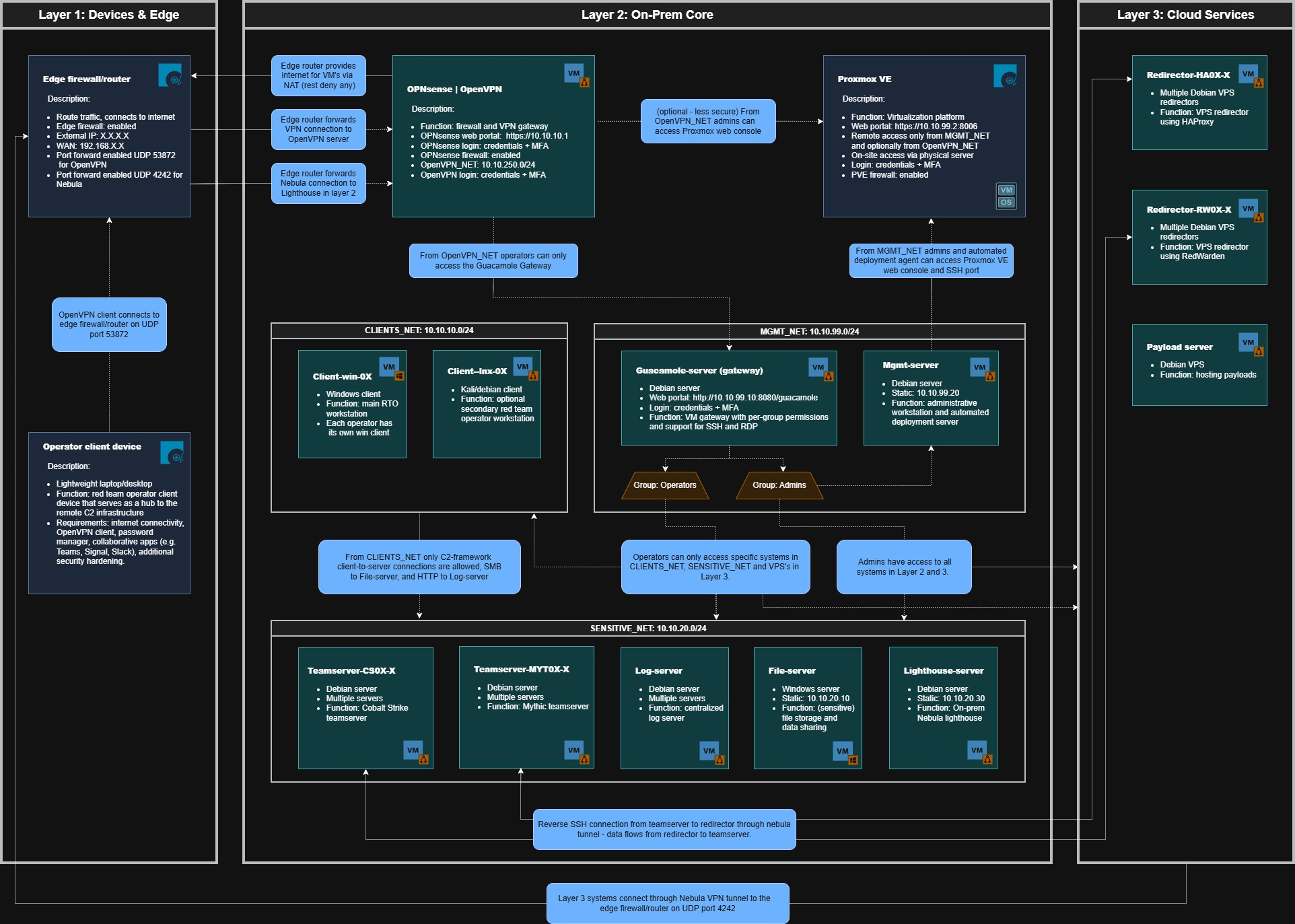

You’ll take a workflow-first approach to C2 design: map a red team operator’s day-to-day activities and translate them into concrete architectural decisions around secure connectivity, segmented access, availability, legal requirements, and operator enablement.

By the end, you’ll have a clear three-layer design that balances robustness, scalability, and cost. This module is intentionally lighter than the ones that follow, but the insights you gain here will make building and extending the C2 infrastructure significantly smoother.

RT-C2E: Advanced Red Team C2 Infrastructure Engineering

Buy nowLearn more

Course Introduction

  • What is this course about?
  • What you will learn
  • Requirements
  • How the rest of this course is structured

Module 1 - C2 Infrastructure Design

  • Module introduction
  • 1.1 Hosting the infrastructure
  • 1.2 Operator workflow
  • 1.3 Design principles
  • 1.4 Infrastructure blue print
  • Assignment

Module 2 - Build the Core Platform

  • Module introduction
  • 2.1 Virtualization platform
  • 2.2 Debian VM template
  • 2.3 OPNsense platform
  • 2.4 Management server (P1)
  • 2.5 Remote access VPN
  • 2.6 Network firewall
  • 2.7 Remote access gateway
  • 2.8 Fine-grained access control
  • Assignment

Module 3 - On-prem essentials

  • Module introduction
  • mgmt-server-package.zip
  • 3.1 Management server (P2)
  • 3.2 Operator Clients
  • 3.3 Client deployment
  • 3.4 Teamservers
  • 3.5 Cobalt Strike
  • 3.6 Cobalt Strike connectivity
  • 3.7 Mythic
  • 3.8 Mythic logging
  • 3.9 Mythic connectivity
  • Assignment

Module 4 - Cloud essentials & Connectivity

  • Module Introduction
  • 4.1 Redirectors
  • 4.2 Providers & registrars
  • 4.3 VPS deployment
  • 4.4 Restricted VPS access
  • 4.5 RedWarden
  • 4.6 HAProxy
  • 4.7 Nebula
  • 4.8 Lighthouse
  • 4.9 Listener
  • 4.10 Forward C2 traffic
  • Assignment

Module 5 - Expand the Infrastructure

  • Module Introduction
  • 5.1 Centralized logging
  • 5.2 Grafana Loki
  • 5.3 Grafana Alloy C2 logs
  • 5.4 Grafana Alloy CLI logs
  • 5.5 Grafana data analytics
  • 5.6 Edge collectors
  • 5.7 Internal file sharing
  • 5.8 Secure data storage
  • 5.9 Operational attack infrastructure
  • Assignment

Module 6 - C2 Automation

  • Module Introduction
  • dashboard-package.zip
  • 6.1 Management dashboard
  • 6.2 Automated deployment
  • 6.3 Deployment flow
  • 6.4 Troubleshooting
  • 6.5 Guacamole connectivity
  • 6.6 User management
  • 6.7 Deployment cleanup
  • 6.8 Health monitor
  • Assignment

Bonus Content

  • B.1 Notifications via aggressor script

Closing Remarks

  • Course Wrap-Up